

Introducing Gustavo and Toby
Introducing Gustavo and Toby
YouTube

No cookies, and no tracking of any kind. You can use any of the tools on this site and your private data will never leave your machine.
I built this site and I operate it by myself. Please consider supporting me to mitigate the costs.
Explore the plugins and their features. All are free to download. Any of the plugins can be customized for your business. Contact me for pricing.
3 products
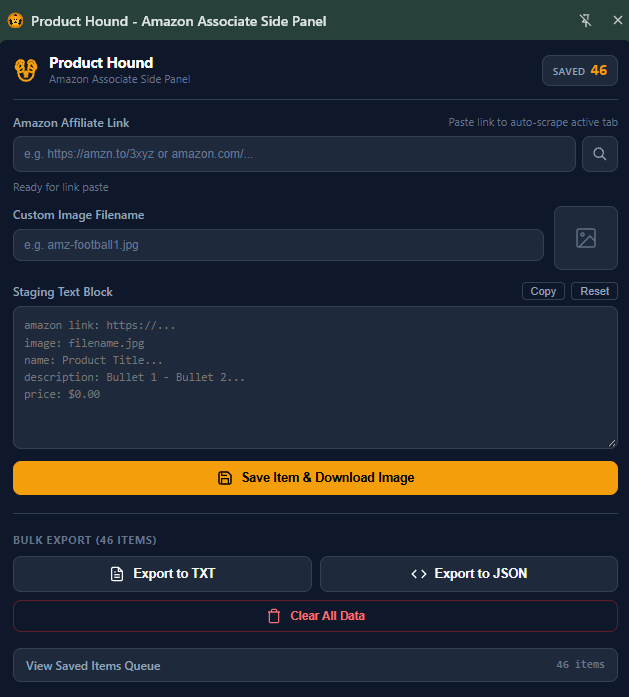
Streamline your affiliate marketing workflow with Product Hound, a dedicated side panel extension designed to save you time when sourcing Amazon products. Instead of manually copying and pasting product specs or downloading images one by one, Product Hound lets you auto-scrape details directly from your active tab just by pasting your affiliate link. It provides a clean, organized workspace to stage, review, and export your affiliate data in bulk directly from your browser.
The core feature of the extension revolves around its seamless data capture and staging capabilities. Simply paste your Amazon affiliate link into the top field, and the plugin automatically pulls the product's title, price, and description into a clean text block. You can also assign a custom image filename to ensure your downloaded photos are immediately organized and ready for your media library. Before saving, the staging text block allows you to review and edit the formatted product details, with quick options to copy the block to your clipboard or reset it to start over.
Once your details are staged perfectly, a single click of the "Save Item & Download Image" button instantly downloads the product photo to your machine while banking the text data. As you source multiple products, the built-in queue system keeps track of how many items you have saved during your session. When you are ready to move everything to your website, you can bulk export your entire list of saved items directly to TXT or JSON formats for rapid data entry, or use the clear data function to start a fresh batch.
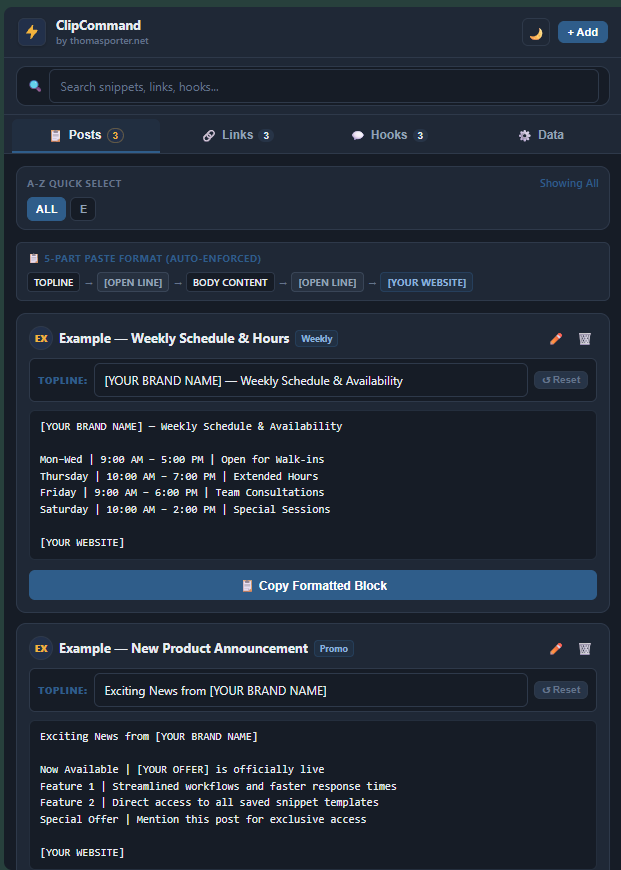
ClipCommand is a comprehensive social marketing side panel extension designed to streamline the management and distribution of formatted social snippets. The plugin centralizes your promotional text blocks, allowing you to organize, search, and copy perfectly formatted content directly from your browser. It serves as a dedicated repository for your marketing assets, keeping your most frequently used promotional data readily accessible in a compact panel.
The extension features a robust organizational system divided into dedicated tabs for Schedules, Links, Hooks, and Data, keeping your content neatly categorized. ClipCommand utilizes an auto-enforced 5-part paste format that automatically structures your posts with a custom topline, schedule or link data, and your promotional URL separated by clean line breaks. Users can quickly type and edit the custom topline for each individual block, with a dedicated reset button available to quickly clear the input and adjust the messaging for different platforms.
Navigating large amounts of saved snippets is simplified through an integrated search bar and an A-Z quick select filter, allowing you to instantly isolate specific teams, opponents, or topics. Each saved snippet card includes quick-action edit and delete icons alongside a prominent "Copy Formatted Block" button that sends the fully structured text straight to your clipboard. The interface is further enhanced by a top navigation bar featuring an "Add" button to continually build your repository and a toggle to switch the panel's visual theme.
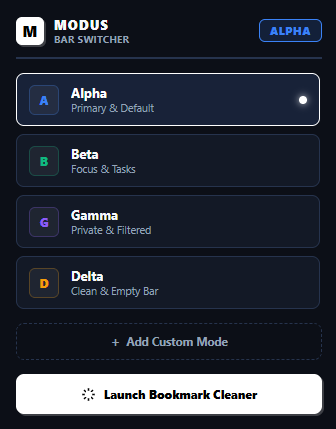
Modus Bookmark Bar is a dynamic browser extension designed to revolutionize how you organize and interact with your saved links. Instead of a single, cluttered row of URLs, this tool allows you to instantly toggle between distinct, context-aware bookmark profiles tailored to your current activity. By segmenting your digital workspace, it transforms your browser into a highly focused environment that adapts to your daily workflow.
The core of the extension is the Bar Switcher, which comes pre-configured with four distinct modes: Alpha for primary and default links, Beta for focus and tasks, Gamma for private and filtered browsing, and Delta for a completely clean and empty bar. If your workflow requires more specific categories, you can easily expand your options using the "+ Add Custom Mode" feature. This seamless mode-switching allows you to compartmentalize your online life, ensuring you only see the tools and links relevant to your immediate goals.
To assist with sorting your existing links, the extension includes a dedicated utility associated with screenshot-modusbar-cleaner.png. Opening in a distraction-free, full-size browser tab, the Modus Cleaner presents your links individually so you can rapidly route them to your Alpha, Beta, or Gamma modes, or choose to delete or skip them using quick keyboard shortcuts. Built for large collections, the cleaner features a top progress bar to track your sorting milestones and a "Save & Continue Later" button, allowing you to organize your bookmarks in manageable sessions.
Free to use in your browser. Video conversion tools are coming in December!
Count words, characters, sentences, and reading time instantly in your browser.
Open toolCompare two blocks of text or code side by side or as a unified diff, entirely in your browser.
Open toolConvert text between title, sentence, uppercase, lowercase, and developer cases.
Open toolCreate a clean, printable invoice or receipt with automatic totals and local PDF printing.
Open toolCreate static QR codes for links, text, Wi-Fi, contacts, and more.
Open toolCreate and download printable barcodes in popular retail and inventory formats.
Open toolCreate strong random passwords, memorable passphrases, and numeric PINs in your browser.
Open toolEncode or decode a URL or one of its components in your browser.
Open toolTurn a title into a lowercase, readable URL path.
Open toolBuild crawler rules, sitemap links, and common robots.txt presets in your browser.
Open toolBuild campaign URLs with standard UTM tracking parameters and preserve existing URL details.
Open toolView and download standard YouTube video thumbnail resolutions from a URL or video ID.
Open toolBuild three search-description drafts from the words you provide.
Open toolFormat, validate, minify, and convert JSON to CSV in your browser.
Open toolConvert a color between HEX, RGB, and HSL and compare contrast.
Open toolEncode or decode UTF-8 text and files with standard or URL-safe Base64 in your browser.
Open toolTest JavaScript regular expressions, inspect matches, captures, and replacement output locally.
Open toolInspect JWT headers, claims, timestamps, and signatures locally without verifying the token.
Open toolMinify or format CSS online with calc-safe whitespace handling and no upload.
Open toolEdit Markdown and preview sanitized GitHub Flavored Markdown in your browser.
Open toolFormat or minify HTML online with selectable indentation and no upload.
Open toolEstimate example AI usage costs from token counts and request frequency.
Open toolConvert and resize images between PNG, JPG, and WebP locally in your browser — with batch ZIP download.
Open toolCreate memes and image captions locally with customizable text and no watermark.
Open toolCompress JPG, PNG, and WebP images to a target size or quality in your browser.
Open toolCalculate an exact age in calendar years, months, and days, and see the next birthday countdown.
Open toolCount calendar days, weeks, and weekdays between dates, or add and subtract time from a date.
Open toolEstimate a pregnancy due date, gestational progress, trimester, and key milestones.
Open toolAdd or subtract durations, calculate elapsed work hours with breaks, or convert time to decimal hours.
Open toolCalculate a percent of a number, percentage change, and increases or decreases.
Open toolUse a countdown timer, lap stopwatch, Pomodoro focus timer, or event countdown in your browser.
Open toolTransform text into copy-and-paste Unicode styles for social profiles and posts.
Open toolGenerate placeholder paragraphs, sentences, words, and HTML lists in your browser.
Open toolGenerate person and character names, band names, acronyms, and usernames in your browser.
Open toolSpin a customizable random picker wheel for names, giveaways, decisions, and team splits.
Open toolDraw or type a signature and download a transparent PNG or SVG locally in your browser.
Open toolCombine and reorder PDF files into one document locally in your browser.
Open toolExtract page ranges or split every page into separate PDFs in your browser.
Open toolConvert and order JPG, PNG, and WebP images into a PDF in your browser.
Open toolBrowse 224 prompts across 30 categories and four skill levels, or explore 132 cheat sheets across 41 topics in web and app development.